

Taxi Navigator · For taxi companies
From the call to the cab. 65% faster.
Call centre, GPS dispatch, navigation to the address and online ordering - in one system that handles the orders by itself and leaves the dispatchers only what needs a person.
How it works
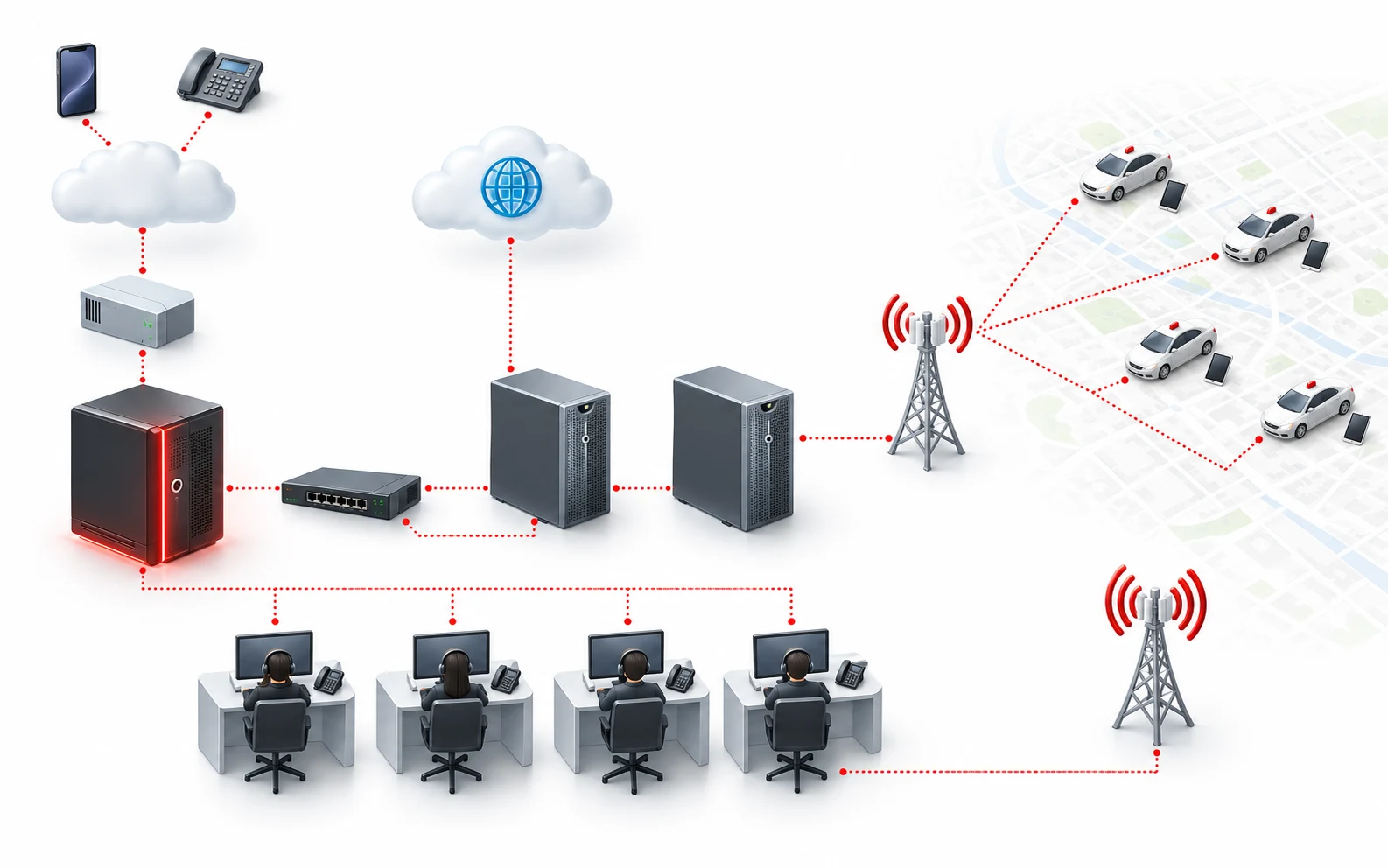
From the order to the ride.
Compared with dispatching by voice, the time from the call until the client is in the cab is 65% shorter (based on 1,000,000 orders).
 1 · Client
The order
The client orders - by phone, on the website or in the mobile app.
 2 · Call centre
Taking the call
The call comes in through the PBX and the client's details show on the dispatcher's screen, who accepts the order.
 3 · GPS server
Picking the cab
The GPS server tracks every cab, picks the most suitable one and sends it the order.
 4 · Driver
Navigation
The driver sees the address on the map, accepts, and the system guides them by the shortest way.
 5 · Notification
Arrival
On arrival the client is told - by the dispatcher, by SMS, Viber or voice.
 6 · Ride
The ride
The client gets in, and while the ride lasts, advertising clips play on the tablet.
Why Taxi Navigator
A voice dispatcher against the system.
65%less time from the call to the cab
| What we compare | By voice | Taxi Navigator |
|---|---|---|
| Time from the call to the cab | As long as the dispatcher takes | 65% shorter |
| Orders per shift (12 hours) | As many as the dispatchers can take | Over 2000 |
| The address to the driver | Read out over the radio | On the tablet, with navigation to it |
| Picking the cab | The dispatcher guesses | The GPS server picks the best one |
| Telling the client | A call from the dispatcher | Automatic - SMS, Viber or voice |
| Online orders | None | Website and mobile apps, no dispatcher |
| Where the cabs are | As the drivers say | On the map, in real time |
Features
The whole taxi company, in one system.
Six modules - from the call to the report on the ride.
Call centre
The PBX is driven by the server - every incoming and outgoing call goes through Taxi Navigator. The call centre takes the orders by phone and from the website and tells the client about the arriving cab.
- PBX interface for maximum automation
- Taking orders and entering the address or picking it from a list
- Addresses with GPS coordinates on a map of the town
- Sending the address to the GPS system or to the radio cabs
- Telling the client the cab has arrived
- Recording of calls between clients and dispatchers
- Statistics and reports
GPS centre
The GPS server tracks every cab's status and position. For each order it looks for a cab by the set criteria, and if the driver refuses - gives the order to the next suitable one.
- Even spread of the cabs across the town
- A wide range of cab selection criteria
- Sequential or competitive offering of orders
- Zoning of the town and queuing the cabs by zone
- Cab groups (limousine, pickup, etc.) and search by group
- GPS cabs and radio cabs in one system
- Reports on rides and on the cabs that passed through a zone
Tablet in the cab
Every cab has a tablet with GPS and mobile data, linked to the server through a private APN. Tablets and smartphones from different makers are supported.
- The order's address on the map
- Navigation for the driver to the client's address
- A button to notify on arrival at the address
- Advertising clips for the client during the ride
- Communication with dispatchers and other cabs
- All the cabs' positions on the map
- Internet access in the cab (option)
Web and mobile ordering
WWWTaxiNavigator takes orders from the website and from an Android and iOS app. The client's address is found automatically, and the orders are handled with no dispatcher.
- Ordering from a computer, smartphone or tablet
- Android and iOS app
- Automatic detection of the client's address
- Tracking the cab in real time
- Handled automatically, with no dispatcher
- A review up to 2 hours after the order and a cab rating
TN-IVR and notifications
TN-IVR takes over much of the dispatchers' work - from taking the order to linking client and driver. The client learns the time, number and model of the cab by SMS, Viber or voice, so cars wait less at the address.
- Automated creation of a taxi order
- Voice notification of the client about the order's status
- Checking an order's status
- Client - driver calls, with the client's number hidden
- Notification by SMS, Viber or IVR voice
Rules and control
The system tracks how long every order takes and imposes and lifts penalties by itself, by set rules, and when needed shows the cab's interior in real time through the tablet's camera.
- Different time norms depending on the selection criterion
- Automatic penalties for late arrival at the address
- Penalties for refusing an order or disrupting radio discipline
- Automatic lifting of the penalties
- Tracking every cab's route
- Video monitoring of the cab's interior through the tablet's camera
Structure
What it takes.
For a company with up to 100 cabs one server runs everything - the call centre, GPS dispatch, online orders and monitoring.
Device
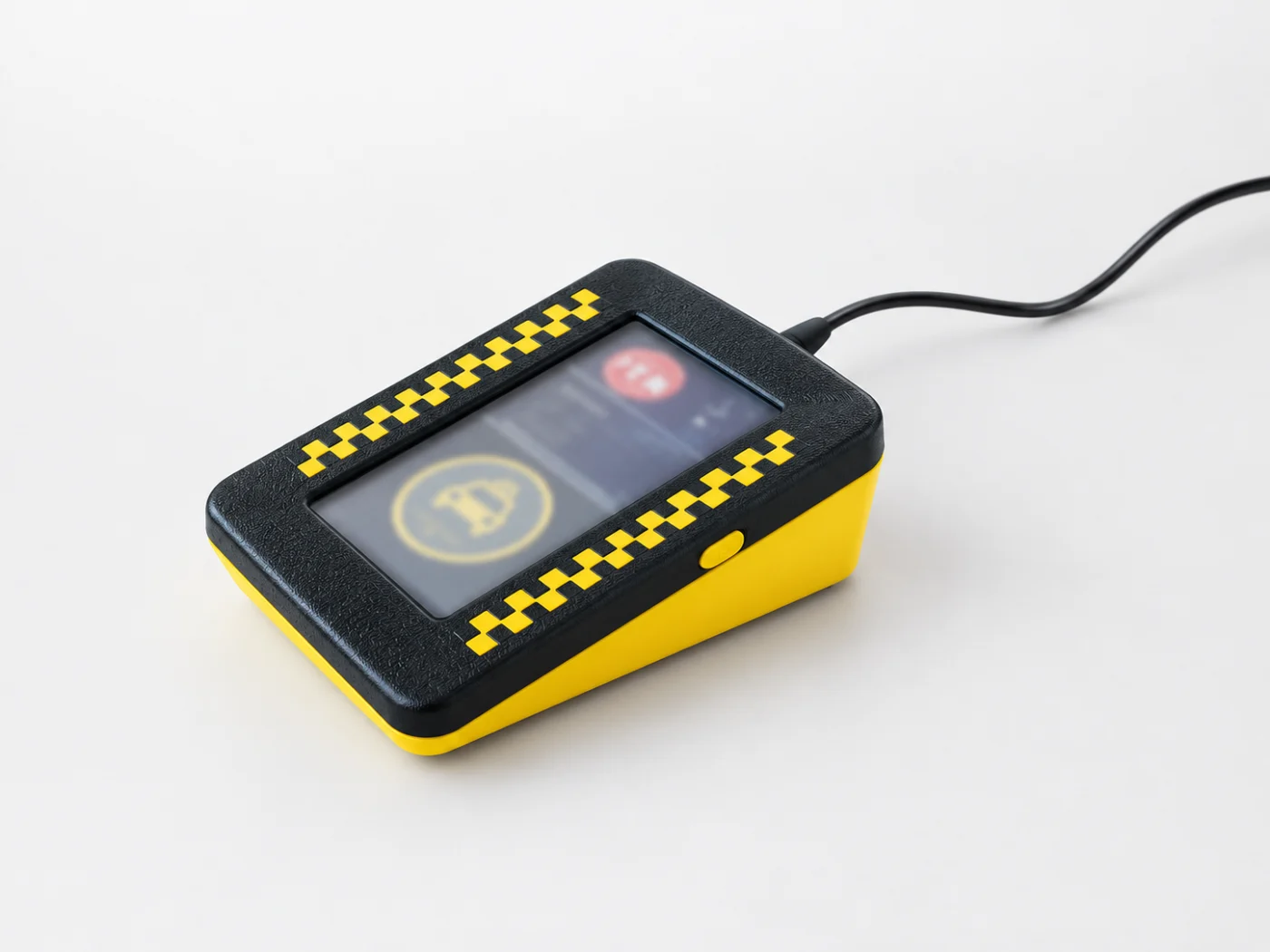
TNCALLBUTTON. A cab at one press.
One press of the button creates an order right in the system, with no dispatcher. The display shows how the order is going. Handy for hospitals, hotels, restaurants and offices.
- An order at one press, with no dispatcher involved
- The order's progress on the display
- Up to 10 orders at once
Mobile app
An app for your passengers. Under your name.
Passengers order a taxi from their phone, see the car on the map and message the driver, and the order goes straight into Taxi Navigator. The app is published in the stores under your company's name and colours.
- An order from address to address - with the price and the time before confirming
- The car type, the payment and the tip - in one step
- The car on the map in real time and when it arrives
- Chat with the driver and call them from the app
- Paying by voucher - companies pay for their staff's rides
- Favourite and recent addresses - and the order history
- 1Ordering from the map
- 2Where to?
- 3The route and the price
- 4New order
- 5The taxi is coming
- 6Chat with the driver
- 7My orders
- 8Vouchers
- 9A new voucher
- 10Paying by voucher
Add-ons
More, when you need it.
Panic button
A hidden button in the car. When pressed, the dispatch centre gets a signal and sees where the cab that needs help is. It also has a port for the taximeter's "busy" signal.
Vouchers
A module for processing vouchers.
Payments
A module for managing payments.
Internet in the cab
Internet access for every cab, as an option.
Want to see it at work? We will show you the system with a scenario of yours.
Request a demoQuestions
Frequently asked questions.
Didn't find your answer? Write to us at office@alphaelsys.com
What does Taxi Navigator need to run?
A server, a private APN from a mobile operator for the link to the tablets, a stable internet connection, a PBX with a control interface, dispatcher computers with Windows on one local network with the server, and Android tablets in the cabs.
Will it work with our PBX?
Yes, if the PBX has a control interface - TAPI, TSAPI, AGI or another. Then the call comes straight into the system and the client's details show on the dispatcher's screen.
What tablets do the cabs need?
Android tablets or smartphones with GPS and mobile data, with power and a mount in the car. Devices from different makers are supported.
Can clients order without a dispatcher?
Yes - on the website, in the mobile app or with the TNCALLBUTTON. The order goes straight into the system, which picks a cab by itself.
How does the client know the cab has arrived?
The system tells them automatically - by SMS, Viber or a voice message, and the dispatcher when needed.
Can we see the system before we decide?
Yes - request a demo with the form below and we will show you Taxi Navigator at work.
Demo